The Software Advice Blog has a interview clip up with Guy Weismantel, Microsoft's Director of ERP Marketing, in which he discusses their strategy for moving Dynamics ERP to the cloud.
He makes a good point; many ERP components are already delivered as cloud based services and we continue to move in that direction. A complete, cloud based ERP won't be suitable for every Dynamics ERP customer but will prove to be a very good for many.
Check out the clip at http://www.softwareadvice.com/articles/enterprise/can-microsoft-dynamics-erp-make-it-to-the-cloud-microsoft-executive-interview-1022211/.
25 February, 2011


16 February, 2011
Updated: Lock Trace Utility for Dynamics GP - PO Support
I received a request to extend the Lock Trace functionality to support locked Purchase Orders. It was a very simple change so I went ahead and implemented that functionality. You can download this new version here if you're interested in knowing who has a Purchase Order locked when you attempt to access it.
I started working on another feature for this utility but didn't want to hold back this new feature while working on that. I created a product page here where I'll document release notes as this utility evolves.
Keep the feedback coming. I have several other ideas for this utility and would like to hear yours.
I started working on another feature for this utility but didn't want to hold back this new feature while working on that. I created a product page here where I'll document release notes as this utility evolves.
Keep the feedback coming. I have several other ideas for this utility and would like to hear yours.
Register Now to Save - Convergence 2011 in Atlanta!
The Early Registration Deadline for Convergence 2011 expires on February 21 and hotels are filling up. That's just 5 days away!
Register now at http://www.microsoft.com/dynamics/convergence/atlanta11/registration.aspx to save $300 off the regular price that kicks in on the 21st.
Register 3+ people and receive another $100 off for the the 3rd + Attendee. Straight Arrow took advantage of this one with many of us invading Atlanta this year. Hope to see you there!
Register now at http://www.microsoft.com/dynamics/convergence/atlanta11/registration.aspx to save $300 off the regular price that kicks in on the 21st.
Register 3+ people and receive another $100 off for the the 3rd + Attendee. Straight Arrow took advantage of this one with many of us invading Atlanta this year. Hope to see you there!
13 February, 2011
Record Lock Trace Addon for Dynamics GP
Natively, Dynamics GP doesn't always do a good job of enabling users to resolve common issues on their own. A classic example of this is the prompt displayed when attempting to access a record that is locked by another user. By default, as a user you are presented with the very generic message:

This is the message presented when attempting to access a document that is locked by another user in Sales Transaction Entry. Now, you can download the free Record Lock Tracing addon for Dynamics GP (Tested on v10 and GP2010) that will replace this generic message with a message that includes the specific user that has the record locked:
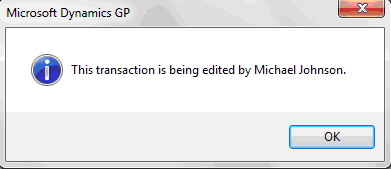
This has already solved some headaches for some of my clients eliminating the need to contact their internal IT department in order to determine which user has a record locked. This is particularly useful during periods with heightened urgency such as when processing shipments and invoices at month end.
This can be extended to include other transactions such as Purchase Orders. I'm happy to build on this further if there is demand for it. Please leave me a comment or send me an e-mail and let me know how I might extend this to add value for you.
04 February, 2011
Creating Customer Invoices using Sql Server Reporting Services 2008 R2
Recently I was tasked with creating a customer facing invoice using Sql Server Reporting Services 2008 R2. This particular client had employed a technique using Page Headers and Footers that didn't upgrade properly once they moved to hosting their reports in SharePoint 2010 Integrated mode.
Because Page Headers and Page Footers are not allowed to have references to data fields, the main issue was with how to consistently place a totals section in a fixed position at the bottom of the page without using a Page Footer.
Making the task even more difficult was the fact that this report should generate all customer invoices at once. Page numbering had to be based on the individual invoice, not the total pages in the "report". Although SSRS 2008 R2 has introduced a new method to reset page numbers on a group, explained by Chris Hays here, I choose to generate my page numbers in SQL rather than in SSRS.
Each one of these techniques deserves a deep dive, but in general this report was accomplished by:
- Using SQL Server window aggregate functions to both limit the number of invoice lines which should be presented on each page and to serve up the page numbers to be grouped upon and used in the display. Read this for more information: Aggregate Functions
- Using one large cell of a table containing rectangles and a nested table for the order lines.
- Fixing the report totals section at the proper location at the bottom of the report.
My idea was that I would limit the number of invoice line items to around 10 per page with my Sql generated page numbers. The report would be grouped by invoice number and page number. I would leave enough whitespace for those 10 lines to grow into therefore the information at the bottom of the report could be fixed just like a page footer.
I was having a difficult time initially getting this to work properly because the "footer" was getting pushed to the second page when the number of lines would grow. After some research, I discovered that the behavior for consuming whitespace has been changed in SSRS 2008 R2. See this article for details: Behavior Changes in Sql Server Reporting Services 2008 R2
Here is the important part:
Preserving White Space in a Report Body or Rectangle Container
Extra white space is no longer removed by default. When you render a report that had extra white space on the report body when viewed on the report design surface, the trailing white space after the last report item on the page is preserved. This may result in more pages for an existing report. To remove the white space, set the report property ConsumeContainerWhitespace to true.
Once I changed the ConsumerContainerWhitespace property to true, the report worked as I expected.
Subscribe to:
Posts (Atom)