I discovered a problem in the way Dynamics GP Evergreen Contract Lines calculated revenue when 1) billing annually and 2) entering a quantity > 1 on the Contract Line. Quite simply, it just didn't calculate the Total Amount on the Contact Line or the Invoice Amounts accurately. This client is running GP 2010.
This was discovered late in the implementation finally being logged as a bug by Microsoft Support just days before data conversion was to be completed for the cutover to production. Yikes!! I was in quite a pinch without a good Plan B just days before go live. After discussing the situation with the Microsoft Field Service Development team they mobilized to produce a fix for this problem in just over 24 hours. Great response!
They really saved the day to ensure a smooth go live and successful Field Service Series implementation for my client. A hotfix for this problem is forthcoming from Microsoft. If you find yourself struggling with this issue when working with Evergreen Contracts in Dynamics GP Contract Administration shoot me a message and I'll help you get by in the meantime.
Showing posts with label Field Service Series. Show all posts
Showing posts with label Field Service Series. Show all posts
03 April, 2011


04 March, 2011
Dynamics GP 2010 R2 Feature List
Straight out of Tech Conference in Fargo this week, thanks to Dave Musgrave http://blogs.msdn.com/b/developingfordynamicsgp/archive/2011/03/04/microsoft-dynamics-gp-technical-conference-2011-day-1-morning.aspx, I came across this graphic that lists some of the exciting new features coming out with Dynamics GP 2010 R2:

There are several other great features and enhancements to Extender, Deployment and Migration Tools, and Email Support among others. It's always good to see that Microsoft continues to invest in what is already such a fantastic product. Well done.

Dave goes on to explain that not only is Dynamics GP not being laid to rest as some have speculated since Microsoft begin investing in Dynamics AX nearly a decade ago but rather in a future release they are planning to include a web based client for Dynamics GP. That's a great improvement that I think we can all look forward to but first let's look at what's coming now:
- Field Service Series customers should be looking forward to some of the FSS enhancements on deck:
- The Contract Line Hold feature is well overdue. I've had several clients that need this functionality.
- Tech Stock Replenishment will be a much welcomed addition. I'm actively working on a project where we are having to work around this.
- Contract Transfer Approval Workflow is something else our Contract Admin clients have been asking for. It's as though Microsoft is reading my mind.
- The Reporting and BI enhancements for Dynamics GP seem endless:
- More Excel Report functionality; Bulk Deployment, Group Excel Reports, Multi-Company Support, and Default Column Ordering will be great enhancements.
- MORE Analytical SSRS Reports and Metrics. I'm not sure any of us can get enough of those!
- New Business Analyzer! Mariano touches on that in his coverage of the conference here http://dynamicsgpblogster.blogspot.com/2011/03/microsoft-dynamics-gp-technical_02.html.
- MORE Word Templates; SOP Returns and Word Template Generator. I was skeptical of the Word Templates after first seeing them at Tech Conference 2010 but I have to admit they're growing on me.
There are several other great features and enhancements to Extender, Deployment and Migration Tools, and Email Support among others. It's always good to see that Microsoft continues to invest in what is already such a fantastic product. Well done.
02 November, 2010
Decisions 2010 - Extending Your GP Distribution Solution with the Field Service Series Session Materials Available for Download
I have posted both a .pdf version and a .ppsx version of the Decisions 2010 - Extending Your GP Distribution Solution with the Field Service Series presentation for download.
23 August, 2010
Cancelling Dynamics GP Contract Lines
If you ever need to cancel Contract Lines (Field Service Contract Administration Module Contract Lines that is) outside of GP try this:
DECLARE @RC int
DECLARE @CONSTS smallint
DECLARE @CONTNBR char(11)
DECLARE @LNSEQNBR numeric(19,5)
DECLARE @CANCELDATE datetime
-- TODO: Set parameter values here.
EXECUTE @RC = [dbo].[SVC_Cancel_Contract_Line]
@CONSTS
,@CONTNBR
,@LNSEQNBR
,@CANCELDATE
GO
The team that developed the Field Service Series made it quite easy to leverage some of the same stored procedures called by GP to perform various functions such as this.
DECLARE @RC int
DECLARE @CONSTS smallint
DECLARE @CONTNBR char(11)
DECLARE @LNSEQNBR numeric(19,5)
DECLARE @CANCELDATE datetime
-- TODO: Set parameter values here.
EXECUTE @RC = [dbo].[SVC_Cancel_Contract_Line]
@CONSTS
,@CONTNBR
,@LNSEQNBR
,@CANCELDATE
GO
The team that developed the Field Service Series made it quite easy to leverage some of the same stored procedures called by GP to perform various functions such as this.
06 August, 2010
More companies are leasing their Equipment in this economy
I read an article in the Nashville Business Journal with survey results that more companies are spending but more are opting to lease their equipment instead of buying. I too am seeing the same out in the field.
If you're already using Dynamics GP to manage your sales operations you're just a few clicks away from using it for managing your leases.
http://mbsguru.blogspot.com/2009/04/dynamics-gp-for-equipment-rentals.html
If you're already using Dynamics GP to manage your sales operations you're just a few clicks away from using it for managing your leases.
http://mbsguru.blogspot.com/2009/04/dynamics-gp-for-equipment-rentals.html
28 April, 2010
The Best of Convergence 2010... from a Consultant's perspective.
I had a great time at Convergence this week. With ~8,500 people in attendance this was quite an event that Microsoft pulled off remarkably. Here's are some of my takes on the conference and some reasons why you should consider attending next year:
1. Learning Opportunities galore! The opportunity for education and learning for everyone at Convergence is at an all time high.
I don't have to administer GP systems on a day to day basis in my role BUT getting the opportunity to sit through another Mariano and Dave show on the Support Debugging Tool reminded me how much work that can be. I had a client at the conference ask me why I hadn't turn him on to this tool before after he had attended the session. Ooops! Visit the Support Debugging Tool Portal for more information http://blogs.msdn.com/developingfordynamicsgp/pages/support-debugging-tool.aspx
I finally got to see a Polino 50 Tips session. You can download the slide deck here http://msdynamicsgp.blogspot.com/2010/04/convergence-2010-50-more-tips-in-50.html. I've been a GP consultant since 1997 and started working with Mark in 1999. Yet, I still learned a lot in this session. Even if you're the most seasoned consultant, GP administrator, or power user you need to check this out. Plus, if you sit up front you are better looking for it.
The interactive sessions were great. GPUG sponsored a session in which we discussed various solutions, problems, and uses applicable to SmartList Builder for Dynamics GP. Participants had an open forum with industry experts & Microsoft Support Engineers to voice their requirements or problems and get immediate feedback, suggestions, and in many cases solutions on the spot. That type of response alone was worth the price of admission.
2. Networking, networking, networking... Together.
Catching up with old friends like Bob McAdam at Tribridge, Dwight Specht at IBIS, Marc Blumenthal at Intelladon, Susan Looby at ACE, and my partner Tom Karpowich at Straight Arrow Consulting was great fun but reconnecting with current and former clients, renewing relationships, and making new connections really made this worthwhile for me. I was able to help a few people out with some problems they were having, a few others helped me find some solutions to some of my clients problems, and I was able to pick up a few new engagements to boot.
3. The Expo was terrific.
The ISV network for Dynamics GP is fantastic. The Closer was quite a popular attraction, I was able to help a client review some retail management solutions with Professional Advantage and Nodus Technologies, and some of the Atlanta Falcon's Cheerleaders dropped by. There's virtually a solution for every problem and requirement at the Expo. It was worth the price of admission just to be able to talk to all of the ISVs and take some of the products for a test drive.
4. Reviewing new and existing but under utilized functionality has better equipped me to serve my clients Today and Tomorrow.
Today: Everyone should spend some time with Excel Report Builder for Dynamics GP. It's extremely simple to use and administer. Admittedly, I had not used this feature of Dynamics GP. But, after sitting through a very well delivered session on the subject I now feel like an expert on the tool. It's that simple and will allow you to very quickly and easily create Excel Reports hooked directly to your GP data that can be accessed by anyone in your organization WITHOUT logging into GP. Saves time and money. Who doesn't like that?
Tomorrow: As a Field Service Consultant, among many other things, I was excited to see some new enhancements coming out to that suite of modules with GP 2010. Consolidated Contract Invoicing, support for Kits and Non Inventory Items, and multi-level escalations are just a few of the great new features coming out next month. Everyone is excited about GP 2010.
5. Dynamics CRM continues to impress on several levels.
I've been working on a CRM Implementation this year and am very familiar with the core functionality and customization tools so I didn't attend sessions on those topics. There were just too many other sessions I felt compelled to attend. But, it was obvious to me that the CRM footprint continues grow within the Dynamics family of products.
I have followed the evolution of the integration between Dynamics CRM and Dynamics GP and was able to attend the session on that. There are many integration options and they continue to grow rapidly. You can learn more about that here http://crm.dynamics.com/en-us/technology/integration.aspx. They demonstrated how non developers can quickly create unique synchronizations between the systems leveraging a simple mapping UI. Of course, there is advanced functionality that does require some developer skills, such as hooking up services to external applications, that will allow you to create more complex integrations.
In summary, I had a great time. The food and drink were abundant and varied. The accommodations were excellent and convenient. The location in the heart of Atlanta was fun and exciting. The people were engaging. The content was of exceptional value. I can't enough about how much I got out of this conference.
Other than the 3 mile hikes between sessions in the Georgia World Congress Center and some bottlenecks in the flow at escalators I just can't find anything to complain about. Of course, with over 8,000 people in attendance you have to expect some logistical challenges. I have to applaud everyone who made the event what it was. Well done! Thank you!
Start making plans for next year!
1. Learning Opportunities galore! The opportunity for education and learning for everyone at Convergence is at an all time high.
I don't have to administer GP systems on a day to day basis in my role BUT getting the opportunity to sit through another Mariano and Dave show on the Support Debugging Tool reminded me how much work that can be. I had a client at the conference ask me why I hadn't turn him on to this tool before after he had attended the session. Ooops! Visit the Support Debugging Tool Portal for more information http://blogs.msdn.com/developingfordynamicsgp/pages/support-debugging-tool.aspx
I finally got to see a Polino 50 Tips session. You can download the slide deck here http://msdynamicsgp.blogspot.com/2010/04/convergence-2010-50-more-tips-in-50.html. I've been a GP consultant since 1997 and started working with Mark in 1999. Yet, I still learned a lot in this session. Even if you're the most seasoned consultant, GP administrator, or power user you need to check this out. Plus, if you sit up front you are better looking for it.
The interactive sessions were great. GPUG sponsored a session in which we discussed various solutions, problems, and uses applicable to SmartList Builder for Dynamics GP. Participants had an open forum with industry experts & Microsoft Support Engineers to voice their requirements or problems and get immediate feedback, suggestions, and in many cases solutions on the spot. That type of response alone was worth the price of admission.
2. Networking, networking, networking... Together.
Catching up with old friends like Bob McAdam at Tribridge, Dwight Specht at IBIS, Marc Blumenthal at Intelladon, Susan Looby at ACE, and my partner Tom Karpowich at Straight Arrow Consulting was great fun but reconnecting with current and former clients, renewing relationships, and making new connections really made this worthwhile for me. I was able to help a few people out with some problems they were having, a few others helped me find some solutions to some of my clients problems, and I was able to pick up a few new engagements to boot.
3. The Expo was terrific.
The ISV network for Dynamics GP is fantastic. The Closer was quite a popular attraction, I was able to help a client review some retail management solutions with Professional Advantage and Nodus Technologies, and some of the Atlanta Falcon's Cheerleaders dropped by. There's virtually a solution for every problem and requirement at the Expo. It was worth the price of admission just to be able to talk to all of the ISVs and take some of the products for a test drive.
4. Reviewing new and existing but under utilized functionality has better equipped me to serve my clients Today and Tomorrow.
Today: Everyone should spend some time with Excel Report Builder for Dynamics GP. It's extremely simple to use and administer. Admittedly, I had not used this feature of Dynamics GP. But, after sitting through a very well delivered session on the subject I now feel like an expert on the tool. It's that simple and will allow you to very quickly and easily create Excel Reports hooked directly to your GP data that can be accessed by anyone in your organization WITHOUT logging into GP. Saves time and money. Who doesn't like that?
Tomorrow: As a Field Service Consultant, among many other things, I was excited to see some new enhancements coming out to that suite of modules with GP 2010. Consolidated Contract Invoicing, support for Kits and Non Inventory Items, and multi-level escalations are just a few of the great new features coming out next month. Everyone is excited about GP 2010.
5. Dynamics CRM continues to impress on several levels.
I've been working on a CRM Implementation this year and am very familiar with the core functionality and customization tools so I didn't attend sessions on those topics. There were just too many other sessions I felt compelled to attend. But, it was obvious to me that the CRM footprint continues grow within the Dynamics family of products.
I have followed the evolution of the integration between Dynamics CRM and Dynamics GP and was able to attend the session on that. There are many integration options and they continue to grow rapidly. You can learn more about that here http://crm.dynamics.com/en-us/technology/integration.aspx. They demonstrated how non developers can quickly create unique synchronizations between the systems leveraging a simple mapping UI. Of course, there is advanced functionality that does require some developer skills, such as hooking up services to external applications, that will allow you to create more complex integrations.
In summary, I had a great time. The food and drink were abundant and varied. The accommodations were excellent and convenient. The location in the heart of Atlanta was fun and exciting. The people were engaging. The content was of exceptional value. I can't enough about how much I got out of this conference.
Other than the 3 mile hikes between sessions in the Georgia World Congress Center and some bottlenecks in the flow at escalators I just can't find anything to complain about. Of course, with over 8,000 people in attendance you have to expect some logistical challenges. I have to applaud everyone who made the event what it was. Well done! Thank you!
Start making plans for next year!
11 April, 2009
Dynamics GP for Equipment Rentals
I recently wrapped up an implementation in the role of solution architect for a multi-location Equipment Rental company. I discussed our design with some of the best GP consultants I know who expressed interest in hearing more. I hope you find this useful.
We chose to lead with the GP Field Service Series; Contract Administration, Returns Management, & Depot Management Module along with the Sales Order Processing and Inventory Control modules to handle Equipment Rental processes and requirements. I continue to be impressed by the variety of applications I have found for this suite of GP modules.
In this scenario, the process begins with the contract. A customer phones the inbound call center and requests equipment for a specified period of time. The call center agent enters the contract terms into Contract Entry/Update. We mapped Contract Type to the customer's Location/Warehouse and customized the way GL distributions were populated (More on that to come).

The Create Order push button simply creates a new sales order header using default from SOP Setup and values from Contract Entry/Update and forces a relationship between the Sales Order (GL Reference) and the Contract (Job). The user then only has to enter the order lines and set the requested ship date then let the standard order fulfillment process run its course.
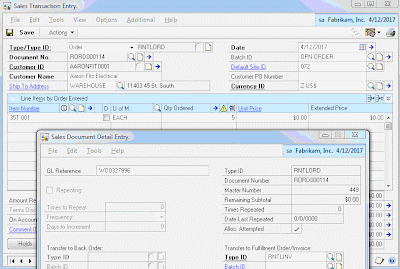
If you have worked with the Contract Administration Module you would realize at this point that we didn't assign any equipment to the Contract. The business process in this scenario is to assign the equipment to the Contract only after the equipment has shipped to the customer. It's only at that point that you would know which serialized piece of equipment was shipped.

At this point, the equipment has been shipped to the customer and the clock is ticking on the contract. You may have noticed that we defaulted the Hold flag on Contract Entry/Update to true (Simply done with VBA). This prevents the contract from being invoiced before the equipment is returned and inspected signaling the completion of the contract. This is where we'll pick up the process next.
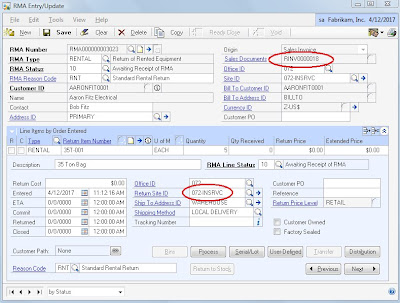
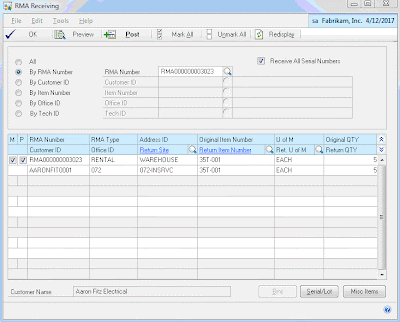
Next, follow the standard process for receive the RMA. This will adjust the returned equipment inventory into the designated In Service Location.
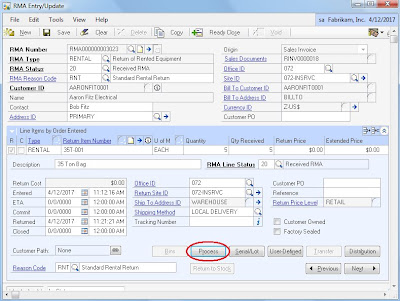
Once received, use the RMA Line Process Return window to create Depot Management Workorders for each item so that it can be inspected and returned to stock.
Post Labor and Parts to the Work Order(s) to track repair costs that might be billed back to the customer later. In this scenario, these charges would not be invoiced separately from the Contract Invoice. Rather, the labor and parts posted against the Work Order(s) will be used later in the process to apply additional repair charges to the Contract before it is billed.

After the parts and labor are posted and Work Order is complete we finished the inspection process by transferring the equipment from the In Service location back to general stock to be available for a future rental.
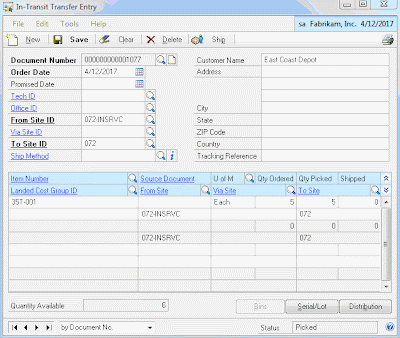
Linking the RMA to the invoice on which the equipment was shipped to the customer and the RMA to the Work Order against which inspection labor and parts are posted allows the backoffice to have visibility to returns of equipment and costs of inspection on unbilled contracts. There's a relationship between the RMA and Work Order all the way back to the Contract through the GL Reference:Job relationship created when the Sales Order was initially created from the Contract.
The final step in the process is to Bill the Contract to create the SOP Invoice to send to the customer for the rental, freight, and repair/inspection charges.
Now, you can enter and track all of your transactions, costs, inventory movements, etc. associated with managing your equipment rental business using the Dynamics GP Field Service Suite which comes packaged with your BRL. There's no need for spreadsheets or disparate systems to manage these processes. We customized this implementation to streamline data processing, ensure consistency, and enforce data integrity. However, you could opt to implement this process without any customization at all.
We chose to lead with the GP Field Service Series; Contract Administration, Returns Management, & Depot Management Module along with the Sales Order Processing and Inventory Control modules to handle Equipment Rental processes and requirements. I continue to be impressed by the variety of applications I have found for this suite of GP modules.
In this scenario, the process begins with the contract. A customer phones the inbound call center and requests equipment for a specified period of time. The call center agent enters the contract terms into Contract Entry/Update. We mapped Contract Type to the customer's Location/Warehouse and customized the way GL distributions were populated (More on that to come).

The next step is to use a push button we added to the Contract Entry/Update window to automate the generation of a Sales Order that the warehouse operations can fulfill to record the shipment of the equipment to the customer. This was a better fit than leveraging native functionality to create the Contract from SOP as the contract needed to be initiated before the SOP Invoice was posted. We setup the equipment as serialized inventory items without cost so that we could track shipments to customers and availability of equipment for rental.
The Create Order push button simply creates a new sales order header using default from SOP Setup and values from Contract Entry/Update and forces a relationship between the Sales Order (GL Reference) and the Contract (Job). The user then only has to enter the order lines and set the requested ship date then let the standard order fulfillment process run its course.

If you have worked with the Contract Administration Module you would realize at this point that we didn't assign any equipment to the Contract. The business process in this scenario is to assign the equipment to the Contract only after the equipment has shipped to the customer. It's only at that point that you would know which serialized piece of equipment was shipped.
We chose to automatically insert the equipment record on the Contract after the order was fulfilled, invoiced, and posted. We placed a trigger on SOP10201 to fire off a stored procedure that assigns the shipped serialized equipment records (SVC00300/SOP10201) to the Contract using the GL Reference:Job relationship. This is also where we assign the GL Account to the contract line based on the Location (SVC00600.CNTTYPE), Type of Customer (RM00101.USERDEF1), and Item Type (IV00101.USCATVLS_1) per the customer requirements.

At this point, the equipment has been shipped to the customer and the clock is ticking on the contract. You may have noticed that we defaulted the Hold flag on Contract Entry/Update to true (Simply done with VBA). This prevents the contract from being invoiced before the equipment is returned and inspected signaling the completion of the contract. This is where we'll pick up the process next.
We implemented the RMA module to track the returns of the equipment from the customer, send the equipment through the depot for inspection, and place the equipment back into stock to be available for future rental. The RMA and Depot Management modules were a great fit for this scenario.
We setup the RMA with a return path of none and to post the received inventory to an In Service Inventory Location. There's no need to credit or bill the customer for anything related to the RMA. We'll handle all of the charges when we bill the Contract later. We linked the RMA to the Invoice that we posted to record the shipment of the equipment to the customer.

Next, follow the standard process for receive the RMA. This will adjust the returned equipment inventory into the designated In Service Location.

Once received, use the RMA Line Process Return window to create Depot Management Workorders for each item so that it can be inspected and returned to stock.

Post Labor and Parts to the Work Order(s) to track repair costs that might be billed back to the customer later. In this scenario, these charges would not be invoiced separately from the Contract Invoice. Rather, the labor and parts posted against the Work Order(s) will be used later in the process to apply additional repair charges to the Contract before it is billed.

After the parts and labor are posted and Work Order is complete we finished the inspection process by transferring the equipment from the In Service location back to general stock to be available for a future rental.

Linking the RMA to the invoice on which the equipment was shipped to the customer and the RMA to the Work Order against which inspection labor and parts are posted allows the backoffice to have visibility to returns of equipment and costs of inspection on unbilled contracts. There's a relationship between the RMA and Work Order all the way back to the Contract through the GL Reference:Job relationship created when the Sales Order was initially created from the Contract.
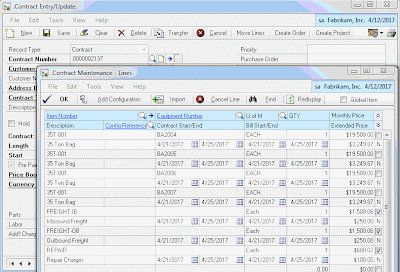
The backoffice now knows that the equipment has been returned, received, and inspected. They can query the costs of repair/inspection and prepare the contract for invoicing. In this scenario they chose to add new contract lines for additional charges such as Freight and Repair.

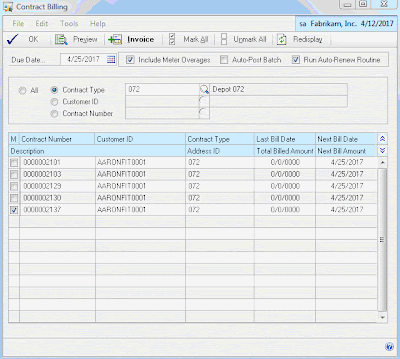
The final step in the process is to Bill the Contract to create the SOP Invoice to send to the customer for the rental, freight, and repair/inspection charges.

Now, you can enter and track all of your transactions, costs, inventory movements, etc. associated with managing your equipment rental business using the Dynamics GP Field Service Suite which comes packaged with your BRL. There's no need for spreadsheets or disparate systems to manage these processes. We customized this implementation to streamline data processing, ensure consistency, and enforce data integrity. However, you could opt to implement this process without any customization at all.
Using this process also allows you to query all of your equipment; in your own inventory (IV00102 and/or IV00200) as well as the equipment that is out on a rental contract (SVC00300 and SVC00601). You can use this information for Available to Promise Reports.
You may have noticed the Create Project Button on the Contract Entry/Update window. We also integrated the FSS Contract with Project Accounting so that we could leverage PAS to track T&M activity related to the equipment rental. PAS was a better fit than Service Call management in this case and maintaining the relationship between the CA Contract and the PA Contract enabled us to report on the profitability of the relationship with the customer by combining both T&M project costs and billing with rental contract transactions.
Subscribe to:
Posts (Atom)