Showing posts with label MJ Solution. Show all posts

28 August, 2011

Record Lock Trace v 2.0

I've updated the Lock Trace Utility for Dynamics GP with 2 new features.

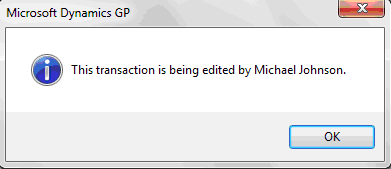
The first enhancement will replace the standard "This batch is being edited by another user" prompt when attempting to post or delete a SOP Batch with the name of the user that has the batch locked with an activity record in SY00800.


The second enhancement will clear all records that are locked by users that are not actively logged in to GP.  This will be executed when attempting to access a transaction locked by a user that is not actively logged in.  After, the record will be available and the following prompt will be presented.


The basic delete statements executed by this feature are listed below:

delete tempdb.dbo.dex_lock where session_id not in (select SQLSESID from dynamics.dbo.activity)
delete tempdb.dbo.dex_session where session_id not in (select SQLSESID from dynamics.dbo.activity)
delete DYNAMICS.dbo.SY00800 where userid not in (select USERID from DYNAMICS.dbo.activity)

If you are not sure what version of the utility you have installed, since there isn't a GUI, I've updated the about message to include the version information.


Download Record Lock Trace for Dynamics GP here or view the product page for more information.  Please leave a comment if there are other features or transaction types that you would like added to this utility.

09 August, 2011

Reconciling SOP Batches from WITHIN Dynamics GP

An article I posted sometime ago with a SQL Script that would reconcile SOP Batch Totals has really developed legs recently.  It's been downloaded several times a week for several months.  As a result, I felt some enhancement was in order.

To that end, I've compiled the same logic, with few exceptions, into an assembly you can download here.  Copy this to your Addins folder and then you can perform this same function from the Sales Batch Entry Additional Menu without having to run a SQL script or access the Reconcile Receivable Amounts Window in GP.


One exception to the logic in the script is that this will not delete empty batches.  If you have an opinion as to how valuable that feature might be please leave a comment and I will evolve this accordingly.  This utility will simply do the following:
  1. Update batch totals for those that are NOT locked by a user with a Batch Activity Record (SY00800).  This was not designed to reconcile a specific batch but rather all batches at once.  So, don't select a batch in Sales Batch Entry when executing this routine unless you want the batch selected to be excluded from the logic.
  2. Create missing Batch Header records for batches that do exist in SOP WORK (SOP10100) but not SY00500.
This will be especially useful if you want to enable GP users to resolve SOP Batch Total discrepancies on their own without having to grant them access to the Reconcile Receivables Amounts window.

This was developed on GP 2010 and tested on both GP 2010 and GP 10.

11 March, 2011

Ooops! I marked a SOP Line as Drop Ship after I fulfilled it

I recently received a request to lock down the Sales Transaction Entry Line Drop Ship checkbox when a line had been fulfilled.  This purpose was to prevent users from mistakenly marking a fulfilled line as Drop Shipped which automatically removes all of the Serial Numbers from the line.

To do this just add the Sales Transaction Entry window to Visual Basic.  Then add the Quantity Fulfilled field and Drop Ship checkbox to your project.  Copy the code below and paste it behind the SalesTransactionEntryDetail(Grid):

Private Sub Grid_AfterLineGotFocus()
    DropShipLock
End Sub

Private Sub QtyFulfilled_AfterUserChanged()
    DropShipLock
End Sub

Private Sub DropShipLock()
    If QtyFulfilled.Value <> 0 Then
        Dropship.Enabled = False
    Else
        Dropship.Enabled = True
    End If
End Sub

This will enable or disable the Drop Ship checkbox based on whether the Quantity Fulfilled is equal to 0 on both the Grid After Line Got focus and Quantity Fulfilled After User Changed events.

You can do this yourself as I describe above or download and import the package file with this code here.

08 March, 2011

GP Password Expired mid-day... while I was posting a Batch

I was recently talking shop with another consultant that has a customer who's Dynamics GP password was valid when they logged in but expired after causing a batch posting interruption.  Has this ever happened to you?

He submitted a support request to Microsoft to explain this issue and seek out a resolution.  The response he received was:

As for ways to overcome the password becoming invalid mid-day, there are two options:

1. Keep the password synchronized (time-wise) with the windows password and use the windows password reminder as a GP password reminder
2. Use the GP Password Expiration Notification utility, freely available from the blog link below

http://mbsguru.blogspot.com/p/dynamics-gp-password-expiration-notice.html

Microsoft recommended the GP Password Expiration Notification utility with qualification, of course, that it is not something Microsoft created or provides support for.  Even so, it's nice to see that this utility is serving the community well by helping to solve and prevent common problems.

If you haven't downloaded it already you should before you have to recover from a batch posting interruption because your password has expired.

16 February, 2011

Updated: Lock Trace Utility for Dynamics GP - PO Support

I received a request to extend the Lock Trace functionality to support locked Purchase Orders.  It was a very simple change so I went ahead and implemented that functionality.  You can download this new version here if you're interested in knowing who has a Purchase Order locked when you attempt to access it.

I started working on another feature for this utility but didn't want to hold back this new feature while working on that.  I created a product page here where I'll document release notes as this utility evolves.

Keep the feedback coming.  I have several other ideas for this utility and would like to hear yours.

13 February, 2011

Record Lock Trace Addon for Dynamics GP

Natively, Dynamics GP doesn't always do a good job of enabling users to resolve common issues on their own.  A classic example of this is the prompt displayed when attempting to access a record that is locked by another user.  By default, as a user you are presented with the very generic message:


This is the message presented when attempting to access a document that is locked by another user in Sales Transaction Entry.  Now, you can download the free Record Lock Tracing addon for Dynamics GP (Tested on v10 and GP2010) that will replace this generic message with a message that includes the specific user that has the record locked:


This has already solved some headaches for some of my clients eliminating the need to contact their internal IT department in order to determine which user has a record locked.  This is particularly useful during periods with heightened urgency such as when processing shipments and invoices at month end.

This can be extended to include other transactions such as Purchase Orders.  I'm happy to build on this further if there is demand for it.  Please leave me a comment or send me an e-mail and let me know how I might extend this to add value for you.

25 August, 2010

20 August, 2010

Dynamics GP Password Expiration Notice

Last year, I posted a VST customization I thought I would sell to a client that would give users advanced notice that their GP Password was about to expire. That version was locked to only work in Fabrikam. Since that sale never materialized, I have unlocked it and am distributing it for free, "AS IS" with no warranties. You can download the unlocked version here! Just drop it in the GP\Addins directory. I have only tested this on version 10 of Dynamics GP.

The Dynamics GP Blogster has talked about why system administrators are not taking advantage of the password policy enforcement feature in Dynamics GP. If you or your customers are growing frustrated that your user's passwords are expiring without notice and IT is having to reset them frequently you might like this mod. It works like this...

For compatibility with SQL2005 I decided to store a Maximum Password Age with the Number of Days before expiration to begin notifying users that their passwords would expire.  I could have integrated it with windows security policy or active directory to get these values directly but I didn't do that here. With SQL2008 you would only need to store the Number of Days before expiration to start notifying because you can query the DaysUntilExpiration LoginProperty in SQL2008.  I wrote this work both ways depending on which version of SQL was running.

To capture the fields I needed I created a new Dynamics GP form in Visual Studio Tools that could be accessed from the Additionals Menu in Company Setup.  I chose to store this data in the DUOS so that I didn't have to deal with creating any new tables.  Therefore, you can setup each company to behave differently which could be a blessing or a curse.


Next, I added a NewHandler in VST on the SwitchCompanyCloseAfterOriginal event to compare the age of the users password to the maximum password age and days before notification captured in the PWExpirationNotice VST Form.  If the user is due to be notified that their password would expire soon I present them with a message box...


... and then the User Password Setup window in which they could change their password on their way into the GP Company.


The prompt and User Password Setup window are only presented on the first login for a session.  So, the users won't be nagged every time they change companies without shutting down GP first.  They also aren't forced to change their password but rather given the option to do so easily at a convenient time so that they don't get locked out later.

12 July, 2010

Advanced RMA Entry R2 - Available for Download/Evaluation

Straight Arrow Consulting, Inc. has made Advanced RMA Entry R2 available for download and evaluation.

The Advanced RMA (aRMA) Add-on for Dynamics GP will help you to maximize the value of the investment you made in your Dynamics GP solution in a number of ways.  This add-on is particularly well suited for manufacturers/distributors and equipment rental companies but has a place in any solution that leverages the Dynamics GP RMA module to service customers.  aRMA extends the Dynamics GP RMA Module to accomplish the following goals:

1.  Allow lines on a single RMA originating from many SOP Invoices.
2.  Allow users to append RMA Lines from varied SOP Invoices to Existing RMAs.
3.  Streamline RMA Entry to improve customer service levels & satisfaction.
4.  Eliminate waste and redundancy in the RMA Entry & Management processes.

I published a brief article about Advanced RMA Entry when we first start working on this product late last year.  Since, we have released the product and are working to make it more widely available.  You can download a fact sheet with the most current functional overview along with the AdvancedRMA.dll file that you will need to install and evaluate the product.

All feedback, recommendations, requests, and inquiries are welcome.

22 December, 2009

Password Expiration Prompt - Using VST to Notify Users before their Password Expires in Dynamics GP

I was recently asked by another consultant to quote a modification that would give users advanced notice before their GP Password was going to expire.  This customer was growing frustrated that their user's passwords were expiring without notice and IT was having to reset them frequently.  The typical work around is to change your GP Password when you change your network password but that wasn't good enough in this instance.  The customer ended up choosing to go with one of the ISV solutions instead of a custom solution for additional features but I went ahead and finished this in my "spare time" anyway.

To make this work with SQL2005 I had to store a Maximum Password Age and the Number of Days before expiration to begin notifying users that their passwords would expire.  I'm sure you could integrate with windows security policy or active directory to get these values directly but I didn't do that here. With SQL2008 you would only need to store the Number of Days before expiration to start notifying because you can query the DaysUntilExpiration LoginProperty in SQL2008.  I wrote this work both ways depending on which version of SQL was running.

To capture the fields I needed I created a new Dynamics GP form in Visual Studio Tools that could be accessed from the Additionals Menu in Company Setup.  I chose to store this data in the DUOS so that I didn't have to deal with creating any new tables.  Therefore, you can setup each company to behave differently which could be a blessing or a curse.  Of course, you could change this to store the data in a custom table but it would also be nice if GP had a installation specific DUOS in the DYNAMICS database for this purpose.  Hint, hint.


Next, I added a NewHandler in VST on the SwitchCompanyCloseAfterOriginal event to compare the age of the users password to the maximum password age and days before notification captured in the PWExpirationNotice VST Form.  If the user is due to be notified that their password would expire soon I present them with a message box...


... and then the User Password Setup window in which they could change their password on their way into the GP Company.


The prompt and User Password Setup window are only presented on the first login for a session.  So, the users won't be nagged every time they change companies without shutting down GP first.  They also aren't forced to change their password but rather given the option to do so easily at a convenient time so that they don't get locked out later.

I chose VST over Modifier/VBA to ease deployment as much as anything.  You can download the .dll for this mod if you want to try it out here.  Just drop it in your Addins directory and it will work in Fabrikam.

28 September, 2009

PO Purchases Account Required during PO Entry

After collaborating with another consultant to develop a solution to make the PO Line Purchase Account required during Purchases Order Entry I decide to make this available for general use "AS IS" with no warranties.  You can download the .dll here.  This has only been tested with GP v10.

This wasn't as simple as just making the field required with Modifier since the Purchasing Item Detail Entry window, on which the field is located, does not have to be loaded during PO Entry.  We accomplished the same thing with VBA but decided that the Visual Studio Toolkit for GP was a better option. If you want the VBA code just shoot me an e-mail and I'll send that to you.

The customization works like this:

During PO Entry, before you lose focus from a PO Line for which a Purchases Account was not entered or for which there was not a default value the system will notify you accordingly and stop you from continuing.


This customization will open Purchasing Item Detail Entry and then prevent the window from being closed or the record from being saved until the Purchases Account field is populated.


It's pretty simple but there were a few challenges we had to overcome.  Now, you don't have to!  If you do use it or just check it out leave me a comment and let me know what you think.

23 September, 2009

Advanced RMA for GP is here!

The Advanced RMA (aRMA) Add-on for Dynamics GP will help you to maximize the value of the investment you made in your Dynamics GP solution in a number of ways. This add-on is particularly well suited for manufacturers/distributors and equipment rental companies but has a place in any solution that leverages the Dynamics GP RMA module to service customers. aRMA extends the Dynamics GP RMA Module to accomplish the following goals:

1. Allow lines on a single RMA originating from many SOP Invoices.
     a. Tie the credit amount on each line back to the originating SOP Invoice.
     b. Reduce the number of RMAs issued to customers and that they have to manage.
2. Allow users to Append RMA Lines from varied SOP Invoices to Existing RMAs.
3. Streamline RMA Entry to improve customer service levels.
4. Eliminate waste and redundancy in the RMA entry process.

Installation


The Advanced RMA Entry Addon is installed by loading the AdvancedRMA.dll in the GP\Addins directory on each Dynamics GP Client. That's it! One file on each workstation.  The .dll contains the logic to complete the one-time server install. So, you don't have to run any SQL scripts, create any SQL Logins, etc. All you have to do is log into GP as 'sa' and after selecting "Advanced RMA Entry" from the Additional Menu in RMA Entry Update when prompted with ...

... say "Yes". This will load the one table (DYNAMICS.dbo.mjRegistration) required for this addon. This table tracks registration information only. Otherwise, the add-on leverages Dynamics GP security, standard database objects, and standard business logic for processing.

User Instructions


1. From the "Additional" menu in RMA Entry/Update select "Advanced RMA Entry".


2. In Advanced RMA Entry, enter values into the filter fields; CustomerID, From Item Number, To Item Number, From Date (Invoice Document Date), and To Date (Invoice Document Date).

3. Click "Apply Filter" to display the list of SOP Invoice lines that meet the criteria you've entered. Any Serialized Lines that are already in inventory or on unreceived RMAs will automatically be filtered out of the results.


4. Now, you can sort the results set in the grid then Mark the SOP Line(s) that the customer wants to return.

5. The RMA Qty will default to the Invoice Qty but can be edited for each line.

6. If a line had been previously partially or fully returned the user will be notified accordingly.


7. When the window is opened the RMA Type, Office ID, and Return Site ID are all populated from the RMA Setup Defaults. Before creating the new RMA you can modify those default values, select a Reason Code, and enter a Customer PO Number if necessary.

8. Finally, click "Create RMA" to create a new RMA using the RMA Interface values and SOP Lines selected in Advanced RMA Entry.


9. You will notice that you can drill back to the RMA in RMA Entry/Update from the RMA Number hyperlink. The RMA can be edited, lines added or removed, etc. in the RMA Entry/Update using standard Dynamics GP functionality.


10. After creating a new RMA, additional SOP Lines can be appended to it. Notice that the "Create RMA" label has changed to "Append RMA" and the Customer ID and RMA Interface Fields have all been locked. Modify the other filter options or re-sort the list of SOP Invoices then select additional lines to append to the RMA.


11. Drill back to the RMA again to see the new lines that were selected, modify the RMA as necessary, and even enter additional lines that didn't originate from a SOP Invoice.


It's very simple and efficient!

aRMA was built using the Visual Studio Toolkit for GP. I'll gladly share it with you if you want to try it out. Just e-mail your request to MichaelJ2@gmail.com.

29 April, 2009

Automatic Aging for GP

The question came up on the Public GP Newsgroup about automating customer aging in GP. I recalled doing this for some customers in the past and found this method works well. GP calls a stored procedure called rmAgeCustomer to execute the Receivables Aging Process. You can do the same and schedule this to run periodically without user intervention. Run a DEXSQL.log when running that routine to trap this yourself.

Below is the SQL that will age all customers, all statement cycles, and all balance types as of the current date. I recommend you test this before deploying in a production environment.

DECLARE @O_iErrorState int, @I_dAgingDate datetime

select @I_dAgingDate = convert(varchar(10), GetDate(), 102)

EXEC dbo.rmAgeCustomer 0, '', 'þþþþþþþþþþþþþþþ', @I_dAgingDate, 127, 0, 0, '', @O_iErrorState OUT

SELECT @O_iErrorState

11 April, 2009

Dynamics GP for Equipment Rentals

I recently wrapped up an implementation in the role of solution architect for a multi-location Equipment Rental company. I discussed our design with some of the best GP consultants I know who expressed interest in hearing more. I hope you find this useful.

We chose to lead with the GP Field Service Series; Contract Administration, Returns Management, & Depot Management Module along with the Sales Order Processing and Inventory Control modules to handle Equipment Rental processes and requirements. I continue to be impressed by the variety of applications I have found for this suite of GP modules.

In this scenario, the process begins with the contract. A customer phones the inbound call center and requests equipment for a specified period of time. The call center agent enters the contract terms into Contract Entry/Update. We mapped Contract Type to the customer's Location/Warehouse and customized the way GL distributions were populated (More on that to come).


The next step is to use a push button we added to the Contract Entry/Update window to automate the generation of a Sales Order that the warehouse operations can fulfill to record the shipment of the equipment to the customer. This was a better fit than leveraging native functionality to create the Contract from SOP as the contract needed to be initiated before the SOP Invoice was posted. We setup the equipment as serialized inventory items without cost so that we could track shipments to customers and availability of equipment for rental.

The Create Order push button simply creates a new sales order header using default from SOP Setup and values from Contract Entry/Update and forces a relationship between the Sales Order (GL Reference) and the Contract (Job). The user then only has to enter the order lines and set the requested ship date then let the standard order fulfillment process run its course.


If you have worked with the Contract Administration Module you would realize at this point that we didn't assign any equipment to the Contract. The business process in this scenario is to assign the equipment to the Contract only after the equipment has shipped to the customer. It's only at that point that you would know which serialized piece of equipment was shipped.

We chose to automatically insert the equipment record on the Contract after the order was fulfilled, invoiced, and posted. We placed a trigger on SOP10201 to fire off a stored procedure that assigns the shipped serialized equipment records (SVC00300/SOP10201) to the Contract using the GL Reference:Job relationship. This is also where we assign the GL Account to the contract line based on the Location (SVC00600.CNTTYPE), Type of Customer (RM00101.USERDEF1), and Item Type (IV00101.USCATVLS_1) per the customer requirements.


At this point, the equipment has been shipped to the customer and the clock is ticking on the contract. You may have noticed that we defaulted the Hold flag on Contract Entry/Update to true (Simply done with VBA). This prevents the contract from being invoiced before the equipment is returned and inspected signaling the completion of the contract. This is where we'll pick up the process next.

We implemented the RMA module to track the returns of the equipment from the customer, send the equipment through the depot for inspection, and place the equipment back into stock to be available for future rental. The RMA and Depot Management modules were a great fit for this scenario.

We setup the RMA with a return path of none and to post the received inventory to an In Service Inventory Location. There's no need to credit or bill the customer for anything related to the RMA. We'll handle all of the charges when we bill the Contract later. We linked the RMA to the Invoice that we posted to record the shipment of the equipment to the customer.


Next, follow the standard process for receive the RMA. This will adjust the returned equipment inventory into the designated In Service Location.


Once received, use the RMA Line Process Return window to create Depot Management Workorders for each item so that it can be inspected and returned to stock.


Post Labor and Parts to the Work Order(s) to track repair costs that might be billed back to the customer later. In this scenario, these charges would not be invoiced separately from the Contract Invoice. Rather, the labor and parts posted against the Work Order(s) will be used later in the process to apply additional repair charges to the Contract before it is billed.


After the parts and labor are posted and Work Order is complete we finished the inspection process by transferring the equipment from the In Service location back to general stock to be available for a future rental.


Linking the RMA to the invoice on which the equipment was shipped to the customer and the RMA to the Work Order against which inspection labor and parts are posted allows the backoffice to have visibility to returns of equipment and costs of inspection on unbilled contracts. There's a relationship between the RMA and Work Order all the way back to the Contract through the GL Reference:Job relationship created when the Sales Order was initially created from the Contract.

The backoffice now knows that the equipment has been returned, received, and inspected. They can query the costs of repair/inspection and prepare the contract for invoicing. In this scenario they chose to add new contract lines for additional charges such as Freight and Repair.


The final step in the process is to Bill the Contract to create the SOP Invoice to send to the customer for the rental, freight, and repair/inspection charges.


Now, you can enter and track all of your transactions, costs, inventory movements, etc. associated with managing your equipment rental business using the Dynamics GP Field Service Suite which comes packaged with your BRL. There's no need for spreadsheets or disparate systems to manage these processes. We customized this implementation to streamline data processing, ensure consistency, and enforce data integrity. However, you could opt to implement this process without any customization at all.

Using this process also allows you to query all of your equipment; in your own inventory (IV00102 and/or IV00200) as well as the equipment that is out on a rental contract (SVC00300 and SVC00601). You can use this information for Available to Promise Reports.

You may have noticed the Create Project Button on the Contract Entry/Update window. We also integrated the FSS Contract with Project Accounting so that we could leverage PAS to track T&M activity related to the equipment rental. PAS was a better fit than Service Call management in this case and maintaining the relationship between the CA Contract and the PA Contract enabled us to report on the profitability of the relationship with the customer by combining both T&M project costs and billing with rental contract transactions.